Real Percussion: drum set
- 4.4
- Rating
- 5.00M
- Installs
- Free
- Price
 Analysis by App-foxy
I approached Real Percussion: drum set less like a conventional mobile game and more like a compact practice room for anyone curious about drumming. It is a free music game from Kolb Apps, built around percussion instruments, guided lessons, and the simple satisfaction of tapping a rhythm with your fingers. That distinction matters: you are not entering a character-driven adventure or chasing a long campaign. You are learning patterns, repeating them, and gradually becoming more comfortable with the layout and timing.
After spending time with it, I found the appeal strongest when I treated each session as a short musical exercise. The game is easy to start, suitable for Everyone, and available on devices running Android 7.0 or later. Its average rating is 4.4 from around 24 thousand ratings, and it has passed 5 million installs, which fits my impression that it serves a broad audience rather than a narrow group of serious musicians.
Learning the layout before chasing better rhythms
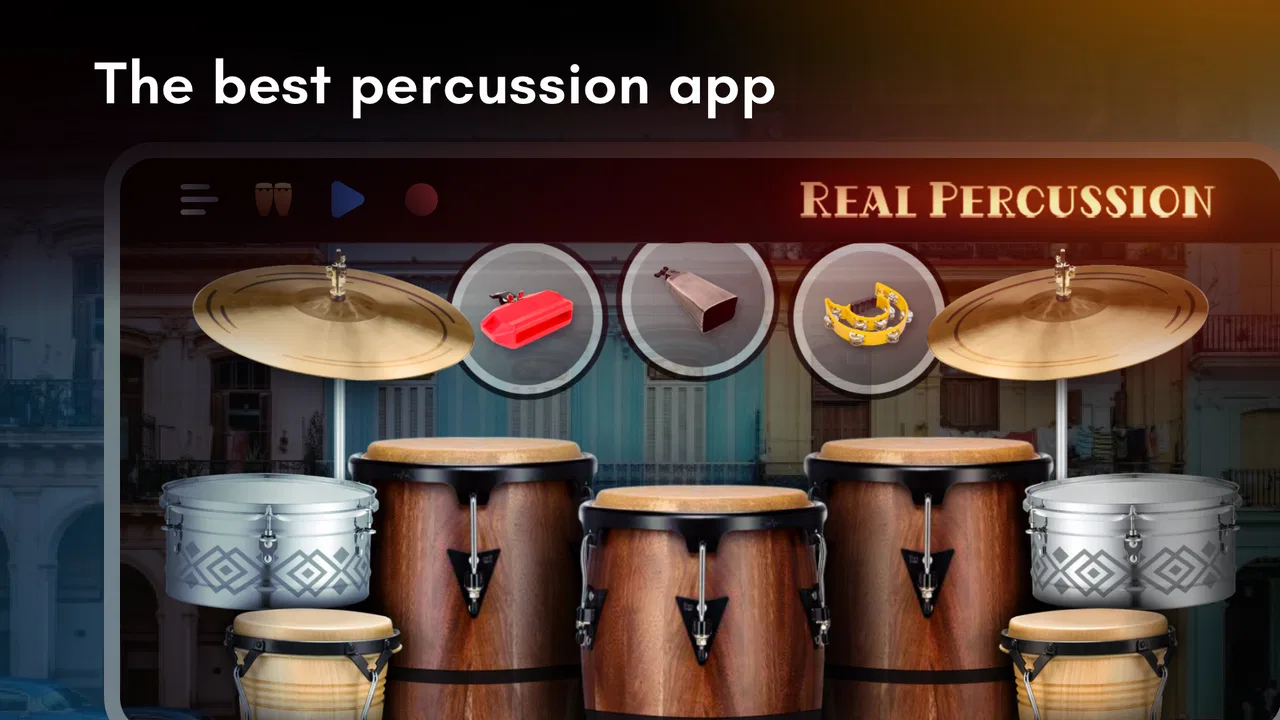
The first useful goal is simply to understand where the percussion sounds are and how your fingers interact with them. That sounds basic, but it is the foundation of the whole experience. On a physical kit, your hands and feet learn positions through repetition. Here, the screen removes the physical distance between instruments, so the challenge becomes recognizing the right pad quickly and tapping with consistent timing.
You May Also Like

 Blood Strike: 2.5 Anniversary
Blood Strike’s Loadouts Turn Every Drop Into a Tactical Gamble
A close look at Blood Strike’s custom loadouts: how fast access to signature weapons reshapes its battle royale rhythm, rewards preparation, and narrows the gap between fights.

 Pandora - Music & Podcasts
Pandora’s Music Is Easy to Start, but Harder to Recover
Pandora’s strength is its low-effort path from a seed to a station. Its weak spot is how much confidence it asks you to place in connection, setup, and quiet recovery.

 8 Ball Pool
 Is Built on Rivalries, Rematches, and Routine
A close look at the rivalries, rematches, shared routines, and unanswered safety questions that turn a quick pool match into a persistent mobile community.

 Samsung Music
’s Quiet Strength Is Playing What You Already Own
Its reach comes less from spectacle than from dependable access to a personal library. That simplicity is both the app’s strongest retention engine and its ceiling.

 AccuWeather: Weather Radar
AccuWeather Review: A Quick, Clear Forecast for Everyday Decisions
For everyday plans, the best forecast is the one you can understand quickly. AccuWeather makes rain timing, radar, and local conditions easy to act on, with a few trade-offs.

 Hill Climb Racing
Why Hill Climb Racing Still Turns Crashes Into One More Run
A tiny car, a bumpy hill and one more upgrade: Hill Climb Racing keeps resurfacing because its simple chaos makes every near-miss feel personal.
More From Our News Desk



The lessons give that early practice some direction. Instead of opening a blank virtual kit and wondering what to do, I could follow an exercise and concentrate on copying the rhythm. This makes the opening more approachable than an ordinary drum simulator, especially for someone who has never held drumsticks. You can begin by listening, watching the pattern, and attempting it without needing to understand musical notation first.
I would not describe the early objectives as elaborate missions. The motivation comes from completing a lesson correctly, noticing that a previously awkward sequence feels more natural, and wanting to try the next pattern. That is a modest loop, but it works well for a music-focused game because improvement is audible and physical. Even a small gain in timing can make the same exercise feel noticeably cleaner.
A practical way to begin is to use one finger for each nearby playing area rather than striking everything with the same finger. I found that this reduces unnecessary movement and makes repeated hits easier to control. It also helps to keep the phone steady. A device that shifts across a table can make a simple lesson feel harder than it really is, particularly when a pattern asks for quick movement between separate parts of the kit.
What progress feels like in practice
The clearest progress signal is not a character level or a large collection of rewards. It is your growing ability to anticipate the next hit. At first, I tended to react after hearing each sound. With repetition, I started preparing the next tap while the current beat was still finishing. That change is subtle, but it is exactly the kind of coordination a beginner needs to develop.
The lesson format also gives practice a useful beginning and end. I could sit down for a short session, work on one pattern, and stop without feeling that I had abandoned a huge open-ended task. This makes the game suitable for spare moments: a few minutes before leaving home, a quiet break, or a quick evening exercise when setting up a real drum kit would be unrealistic.
There is a second kind of progress that comes from exploring outside the guided material. Once I understood the basic arrangement, I could experiment with my own combinations and listen to how different hits fit together. This is where the app becomes more than a sequence of lessons. It gives curious players a low-pressure place to test rhythm ideas without worrying about a band, an instructor, or expensive equipment.
That freedom has a trade-off. Players who need a clearly defined achievement ladder may find the experience less compelling than a traditional rhythm game with visible stages, scores, and unlocks. The satisfaction here depends heavily on whether you value learning and experimentation. If your preferred reward is a dramatic new ability or a constant stream of collectibles, the progression may feel quiet.
I also recommend repeating a lesson after a short pause rather than immediately restarting it over and over. Continuous retries can turn the rhythm into a mechanical guessing exercise. A brief reset helps me hear the pattern again instead of relying only on muscle memory. For beginners, that balance between listening and tapping is more useful than simply trying to finish as quickly as possible.
How the difficulty rises without becoming a wall
The difficulty curve is mainly about coordination, speed, and accuracy. Early patterns let you become familiar with individual sounds and basic sequences. Later exercises demand more attention because the space between hits becomes less forgiving, or because your fingers need to move between different areas with greater confidence. The increase feels natural when I approach it as practice rather than as a test I must pass immediately.
One important point is that screen size changes the experience. On a larger phone, the playing areas are easier to distinguish and simultaneous taps feel less cramped. On a small display, the same lesson can become a precision challenge because your fingers cover more of the interface. This is not a flaw unique to the app, but it means a player should not judge their rhythm ability after struggling on a narrow screen.
Touchscreen drumming also has limits compared with a physical kit. There is no real rebound from a drumhead, no pedal movement under your foot, and no natural stick technique. The app can teach timing, pattern recognition, and basic coordination, but it cannot replace the physical feedback of acoustic or electronic drums. I see it as an accessible starting point and a practice aid, not as a complete course in drumming technique.
For that reason, I would use the lessons in layers. First, I would play them slowly enough to identify each sound. Next, I would repeat them while focusing on even spacing. Finally, I would try to maintain the pattern without staring at every target. This approach makes the difficulty feel manageable and reveals whether the problem is memory, timing, or finger movement.
The game is also more forgiving as a casual activity than as a strict rhythm competition. Someone looking for exact scoring and tournament-style precision may find the feedback less motivating than a dedicated rhythm title. Someone who wants to understand how a beat is assembled will probably appreciate the gentler learning curve. That difference should guide your expectations before downloading it.
What keeps the sessions going—and where the motivation fades
The strongest retention pressure comes from the desire to improve a pattern that was almost right. I often wanted one more attempt after missing a transition, not because the app forced me to continue, but because the mistake was easy to identify. That is a healthy kind of replay value. The goal is personal control rather than an artificial task list.
Lessons are especially effective for maintaining momentum during the first sessions. They answer the question “what should I try next?” without requiring much setup. After that, the experience depends more on your own interest. You may continue because you want smoother timing, because you enjoy making simple beats, or because the virtual kit is convenient when a physical instrument is unavailable.
There is no need to purchase the game to try its basic idea: it is free to download. Optional in-app purchases range from $1.99 to $18.99 per item, so I would approach them carefully and decide whether the free experience already meets your needs before spending anything. For a learner, the important question is not the presence of optional purchases but whether the available lessons and playing space give enough value for casual practice.
The pacing is best in short bursts. A long session can become repetitive because the central activity remains tapping percussion patterns. I would not recommend it to someone seeking a story, changing scenery, or a large variety of game mechanics. Its narrow focus is also its identity: if you enjoy rhythm practice, that focus feels purposeful; if you need constant novelty, it may feel limited.
A realistic everyday use case is a beginner who has watched drumming videos but has no room, budget, or confidence for a full kit. They can use the app to learn basic coordination privately, repeat a lesson several times, and decide whether the instrument genuinely interests them. Another good use case is a musician who wants to sketch a rhythm idea away from their kit. It will not reproduce every aspect of a studio setup, but it is faster than carrying equipment and more engaging than silently imagining the beat.
I would skip it if your main goal is professional recording, detailed technical instruction, or a realistic replacement for drum hardware. I would also skip it if you only enjoy games with strong narrative progression and frequent unlocks. The app’s retention loop is practice-based, so it rewards patience more than collecting.
How it compares with ordinary alternatives
Compared with tapping along to music in a standard rhythm game, this experience feels more focused on the instrument itself. Rhythm games usually emphasize matching notes to a song, chasing a score, or reacting to a visual track. Here, the useful question is often whether you can reproduce a percussion pattern and understand the role of each hit. That makes it more educational, even though it remains accessible and game-like.
Compared with a real drum kit, the advantage is convenience. You can start immediately, practice quietly, and avoid the space and cost associated with physical equipment. The disadvantage is equally clear: touchscreen taps do not teach posture, stick grip, foot coordination, volume control, or the physical feel of a drumhead. I would use this app before buying equipment, not instead of learning on equipment forever.
Compared with a blank virtual instrument, the lessons are the deciding advantage. A free-play surface can be enjoyable, but beginners often run out of ideas quickly. Structured exercises provide a reason to return and make improvement easier to notice. The compromise is that players who already know how to drum may find the guided material too introductory and spend more time using the kit freely.
One tip that made the experience more useful for me was to separate “learning the pattern” from “performing the pattern.” During the first attempts, I focused on which surface came next. Once that became familiar, I paid attention to even timing and relaxed movement. Trying to perfect both at once creates unnecessary frustration, especially on a phone where visual space is limited.
Another helpful workflow is to practice with the phone placed securely and the audio at a comfortable level, then repeat the same lesson with less visual attention. This tests whether you are actually hearing and remembering the rhythm. It also exposes a common weakness: a pattern may look easy while you are watching every cue, but feel much less stable when your eyes move away.
Because the current version is 6.51.1 and the game has been available since December 22, 2013, it feels like an established mobile title rather than a brand-new experiment. That long presence, together with its broad install base, makes it an easy recommendation for trying digital percussion without much commitment. Still, longevity does not change the central limitation: its value depends on whether you enjoy repeating rhythms.
My progression verdict
Real Percussion: drum set succeeds because it keeps its promise small and understandable. The early goal is to learn the playing areas and follow a beat. Progress appears when your hands anticipate patterns more confidently. Difficulty rises through coordination and timing rather than through complicated systems. Retention comes from the wish to play a lesson more cleanly or create something of your own.
That progression is satisfying for beginners, casual learners, and curious musicians who want a portable percussion surface. It is less convincing for players who need a deep unlock structure, competitive scoring, or a full technical curriculum. I would recommend it to a friend who asked for an approachable way to explore drumming, especially before deciding whether a physical kit is worth pursuing.
My final advice is to judge it after several focused sessions rather than one quick tap. Give the lessons time to show their value, try repeating a pattern with less visual help, and experiment with your own combinations once the layout feels familiar. If that process feels rewarding, this free music game can become a useful little practice companion. If it feels repetitive from the start, no amount of progression will turn it into the kind of rhythm game you are looking for.
Kolb Apps has created something straightforward rather than spectacular, and I think that is the right way to view it. Its best feature is the low barrier between curiosity and actual practice. You will not get the complete experience of sitting behind a drum kit, but you can learn basic rhythmic control, test your interest, and enjoy making percussion patterns wherever your phone happens to be.
FAQs for Real Percussion: drum set
01What is Real Percussion: drum set?
Real Percussion: drum set is a virtual drumming app that turns your Android or iOS device into a playable drum kit. It typically includes realistic-looking drums, cymbals, and percussion pads that you can tap with your fingers. The app is aimed at beginners, music fans, and experienced players who want to practice rhythms or play casually without carrying a physical drum set.
02Can beginners use Real Percussion: drum set easily?
Yes. The app is generally easy for beginners because the controls are based on simple touchscreen taps. You can start by experimenting with individual drums and cymbals, then practice basic beats at your own pace. However, users who are completely new to drumming may need some time to coordinate both hands and learn where each virtual instrument is positioned on the screen.
03Does Real Percussion: drum set work without an internet connection?
Many of the core drumming functions can usually be used offline after the application has been installed, which is convenient for practicing while traveling or when mobile data is unavailable. Some additional content, advertisements, updates, online features, or downloadable sound packs may require an internet connection. It is best to open the app once online so all available resources can load correctly.
04Does the app include realistic sounds and useful practice features?
Real Percussion: drum set is designed to provide responsive percussion sounds when you tap the virtual pads. The experience can feel convincing on a phone or tablet, especially with headphones or a good speaker. Depending on the version, users may find different drum kits, rhythms, recording tools, lessons, or play-along features. Sound quality and available options can vary by device.
05Is Real Percussion: drum set free to download and safe to install?
The application is generally available as a free download, although free versions may contain advertising, optional purchases, or locked content. Before installing, check the official Google Play Store or Apple App Store listing for the latest permissions, developer information, ratings, and compatibility details. Downloading from an official store is the safest option and helps ensure that you receive the legitimate, updated version.
Pros
- Responsive touch controls make playing rhythms feel natural.
- Includes multiple drum sounds for varied musical styles.
- Useful for practicing timing
- beats
- and basic percussion patterns.
- Quick to launch and suitable for short practice sessions.
- Works well as a portable rhythm tool without extra equipment.
Cons
- Accidental touches can trigger nearby drums on smaller screens.
- Advanced players may find the available instruments limiting.
- Realistic performance depends heavily on your device’s speakers.
- Extended play can become repetitive without recording or sharing tools.
- Some features or content may require ads or in-app purchases.

Real Percussion: drum set
Gallery